Engagements

Every piece of client work. One page.

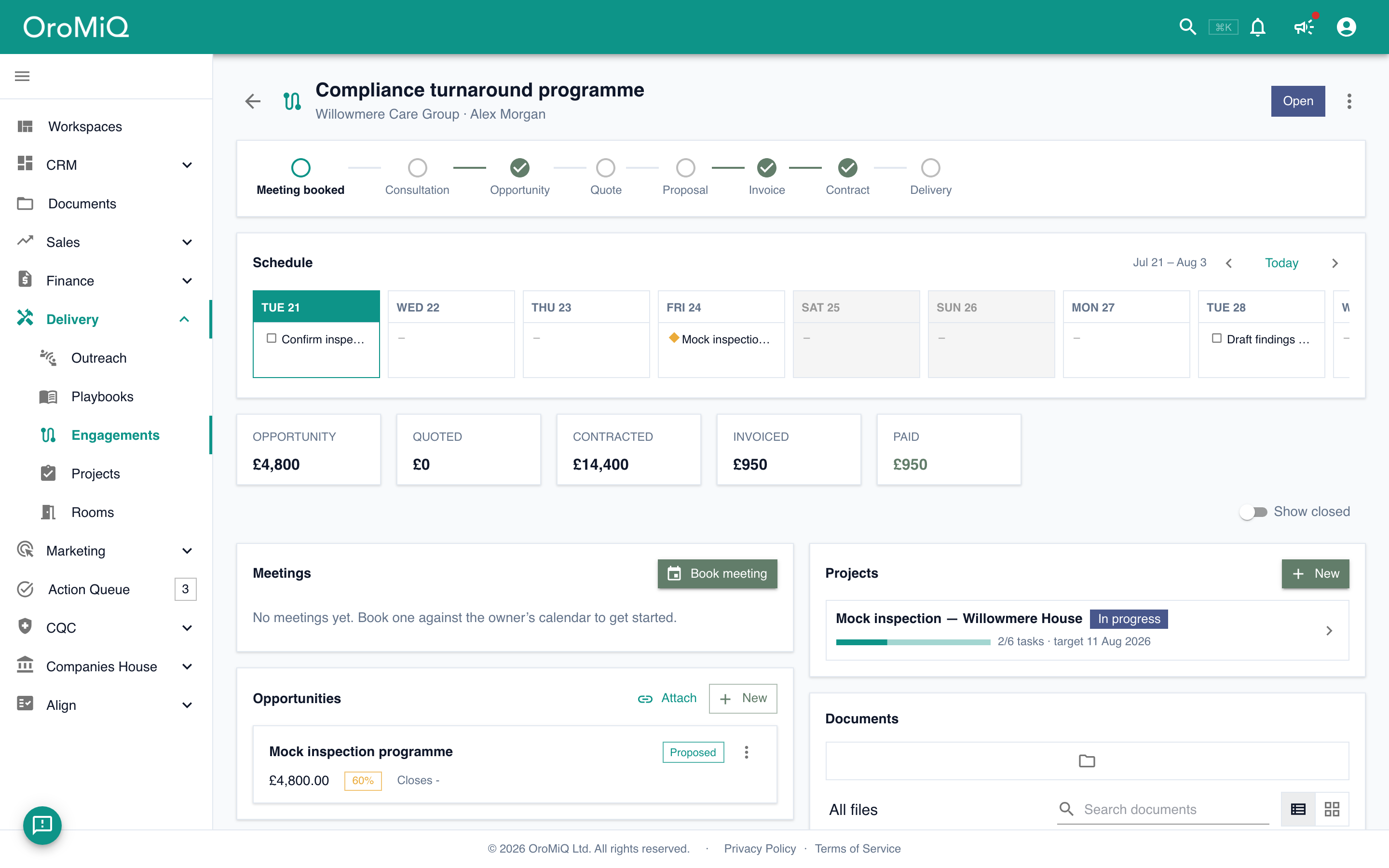
An engagement is the journey workspace for one piece of client work: it ties the first meeting, the consultation, the quote, the contract, the delivery and the invoices together, and keeps score as you go. Nothing about the client lives in a second system, a shared drive or someone's head.

MeetingConsultationOpportunityQuoteProposalInvoiceContractDelivery

Eight milestones, tracked automatically from the records themselves.

The workspace

From first meeting to final invoice, without changing tabs.

A progress bar that fills itself

Every step is derived from the real record behind it: the meeting ticks when it is booked, the quote when it is sent, the contract when it is signed, delivery when every project is complete. When reality disagrees, pin a step done or skip it with one click.

The numbers, live

Pipeline value, quoted, contracted, billed and paid, rolled up from the records attached to the engagement. No spreadsheet on the side, no asking around for the latest figure.

Everything attached, nothing retyped

Opportunities, quotes, invoices, contracts, projects, meetings, documents, secure rooms, time, expenses and notes all live on the engagement. Each one is the real CRM record, linked once and visible in context.

Meetings

Book the meeting where the work lives.

The first milestone on any engagement is a meeting, so booking one is built into the page. Pick a slot from the calendar owner's real availability, choose how you are meeting, invite the right contact, and the event is created in Microsoft 365 with everything attributed back to the engagement.

  • Live availability from the Microsoft 365 calendar of the person being booked, with per-type duration, notice and buffer rules
  • Online, in person or by phone: Teams links are added automatically, and in-person meetings carry the address on the invite
  • Meetings from 15 minutes to a full working day, so a half-day site visit is as bookable as a quick catch-up
  • Optionally attach a structured consultation to the booking, so what was discussed is captured against the client
  • Every booking lands back on the engagement and ticks the milestone on its own
  • A rolling two-week schedule strip shows meetings and project deadlines side by side, so you can see the workload before you commit to a date

Agreed rates

Agree a rate once. It is honoured everywhere.

Most CRMs know your list prices. OroMiQ also knows what each client actually signed. Put the agreed rates on the client's contract, a day rate, an hourly rate, any product in your catalogue, and every quote, invoice and time entry on that engagement prices at the agreed figure automatically. List prices still apply to everyone else, and a manually entered price on a line always wins when you need an exception.

Rates live on the contract

The rate schedule sits on the signed agreement, where negotiated terms belong. Each rate carries an effective date, so the paperwork and the pricing can never drift apart.

Variations, done properly

When terms change mid-engagement, raise a variation: its own signable document with its own rates and effective date. Work done before the date bills at the old rate, work done after bills at the new one, automatically.

Contracts

Signed, numbered, tracked and renewed.

Contracts are the agreement layer of the engagement: what was agreed, until when, and what happens next. Generate one from a won quote, send it for electronic signature, and track it through to renewal without leaving the page.

  • A clear lifecycle: draft, sent, active, with the contract number minted at send and never reused
  • Contract families: keep a master agreement with its statements of work and variations underneath it
  • Renewal dates and notice deadlines tracked automatically, with expiring agreements surfaced before it is too late to act
  • Built-in electronic signing: multiple signers, in sequence or all at once, with a full audit trail of who viewed and signed, and when
  • The executed copy is stored as an immutable document record the moment signing completes
  • Raise an invoice directly from an active contract

Delivery

Projects you can actually see.

Winning the work is half the journey. Projects carry the other half: the tasks, deliverables and deadlines that turn a signed contract into a delivered service, connected to the same engagement so progress is never a mystery.

  • Checklist-style tasks grouped into sections, with deliverables marked out as milestones
  • A timeline view that plots task bars and deliverable markers against their dates
  • Project templates with relative dates, so a repeatable service becomes a project in seconds
  • Convert an accepted quote straight into a project, with sold line items carried over as deliverables
  • Dated tasks flow into each person’s action queue, so delivery work sits alongside follow-ups
  • Attach quotes, invoices, contracts and documents to a project: the engagement still shows them, badged with the project they belong to

Time, expenses and billing

Month end in minutes, not evenings.

Track the time

Log time in minutes with notes against the engagement, a project or a single task. Hourly and day-rate items are both supported, and each entry picks up the client's agreed rate for the date the work was done. A personal timesheet shows the week at a glance with running totals of hours and value.

Capture the costs

Record expenses with categories, VAT and an attached receipt or invoice, against the engagement or the project they belong to. Mark an expense as rebillable and it queues itself for the next invoice instead of getting lost in a drawer.

Bill it in one step

One action gathers everything unbilled for the period: time grouped per rate, rebillable expenses line by line, and completed fixed-fee deliverables priced from the quote they were sold on. The result is a single draft invoice you can edit before it goes out, and everything billed is marked, so nothing is ever invoiced twice.

Invoices themselves are numbered at issue, carry a per-rate VAT breakdown, and track partial payments and outstanding balances.

Secure rooms

A client portal without the client login.

Some client work involves documents too sensitive for an email thread. Secure rooms give each engagement a private, branded space where clients view, upload and complete tasks, encrypted at rest and recorded end to end.

Read how we protect it →
  • Guests open the room from a personal link. No account, no password to remember
  • Optional step-ups when you want them: email verification codes, a room password, link expiry and view-only mode
  • A Home tab you write yourself in rich text, plus Tasks and Documents tabs for the guest
  • Tasks cover both to-dos your client can tick off and file requests, where uploads file themselves into the folder you chose
  • Private inside your organisation too: only the room owner and invited teammates can open it
  • Every open, view, download and upload is recorded with who, when and from where, and the whole trail exports to Excel for auditing
  • Preview the room exactly as a guest sees it before anything is sent

Documents

Filed where the work is.

Every engagement has its own file explorer: folders, drag and drop, right-click actions and multi-select, scoped to that piece of work. Generated artifacts like sent quotes, contracts and invoices are kept as immutable records, so the paper trail stays a paper trail.

Questions, answered

What is an engagement in OroMiQ?

An engagement is the workspace for one piece of client work. It ties the journey together on a single page: the first meeting, the consultation, the opportunity, the quote, the contract, the delivery projects and the invoices, plus the time, expenses, documents and secure rooms that go with them. A company can have several engagements over time, and each keeps its own history.

Does it replace the pipeline?

No. Opportunities still live in the pipeline and deals are still worked there. The engagement is the page around the deal: it links the opportunity to everything else that belongs to the same piece of work, and keeps score across the whole journey.

Can I bill time at rates agreed with a specific client?

Yes. Agreed rates live on the client’s contract with effective dates. Quotes, invoices and time entries for that engagement price at the agreed rate automatically, list prices apply to everyone else, and a manually entered price on a line always wins. When terms change, a variation carries the new rates from its effective date.

Do my clients need an OroMiQ account to use secure rooms?

No. Each guest receives a personal link by email and opens the room in their browser. You can add email verification codes, a room password, link expiry and view-only mode when the content calls for it.

What do I need for meeting booking?

The person being booked needs their Microsoft 365 calendar connected to OroMiQ. Slots are computed from their real availability and the invite is created directly in their calendar.

Run the whole journey on one page.

Get started, or take the demo for a spin.